 by Incarn
Updated October 7, 2026
How to bring old photos to life
To bring an old photo to life, you scan it and upload it to an AI photo animator. You get back a short video, about five seconds long, where the face moves naturally: a blink, a breath, a slight turn of the head. On Incarn, the service that publishes this site, it takes about a minute, and your first animation is free to preview.

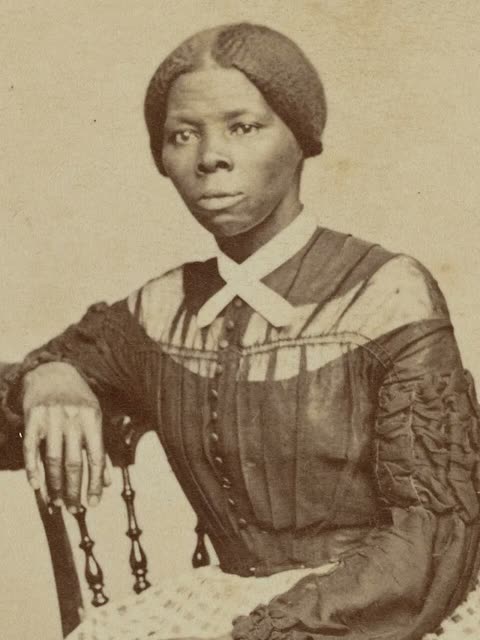
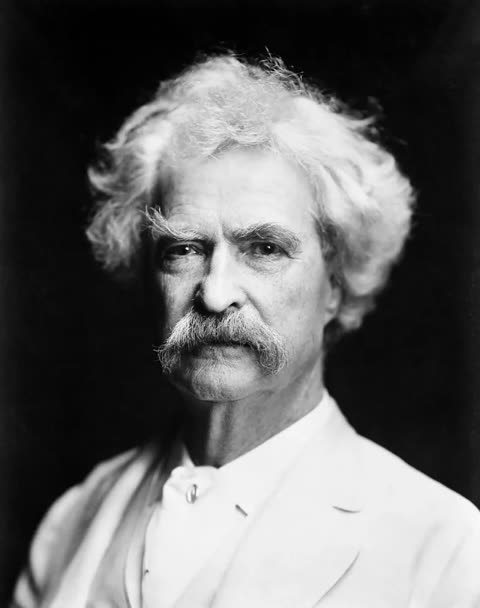

These are real results from public-domain portraits: on the left the original photograph, on the right the animation.
Step by step
- Digitize the photo. A flatbed scan at 600 dpi gives the best result. A phone picture works too if you shoot straight on, in daylight, without flash or glare. Crop so that the face fills a good part of the frame. More tips.
- Upload it. On Incarn, you enter your email (that is where your video is sent): no password, no credit card. Then you pick the photo from your phone or computer.
- Wait about a minute. Most animations are ready in one to two minutes. Nothing to adjust, no prompt to write.
- Watch, then download. Your first animation is free as a low-resolution preview with a watermark. The HD version, without watermark, can be downloaded from €1.99.
Animate a photo on Incarn First animation free to preview, then from €1.99 per photo. No subscription.
Which photos work best
The animation works on the face, so the face is what matters:
- one clearly visible face, looking roughly toward the camera;
- sharp enough to see the eyes;
- black and white or color, both work;
- an old, creased or faded print works as long as the face itself is intact.
Profiles, very small faces in a group photo and very blurry pictures give weaker results. Incarn checks your photo before animating it and warns you if the face looks too small or too blurry; it only refuses photos with no face at all.
What it costs
There is no subscription. One photo costs €1.99. If you have several, packs bring the price down: 5 photos for €6.99, 10 for €11.99, 25 for €24.99 and 50 for €39.99, which is €0.80 per photo. Credits never expire. What exactly is free.
Is it safe?
Before uploading family photos anywhere, check how long the service keeps them and whether you can delete them. On Incarn, the animations you pay for stay in your account until you delete it, and previews you did not pay for are removed after 45 days. The full checklist.
Other ways to do it
MyHeritage offers Deep Nostalgia and LiveMemory, which work well, as part of a MyHeritage subscription: how the two compare. You can also animate a photo inside ChatGPT with an app, in the countries where ChatGPT apps are available: here is how.
Keep reading
Questions
How long is the animated video?
About five seconds. That is enough to see the person blink, breathe and move their head, and it can be watched in a loop or shared as a short video.
Can I animate a black and white photo?
Yes. Black and white portraits work just as well as color ones. Colorizing first is optional.
Does it work with group photos?
It works best with one main face. For a group photo, crop around the person you want to animate and do one person at a time.
Do I need to install an app?
No. Incarn works in the browser, on a phone or a computer.
Who publishes this site?
Incarn, an online service that animates old family photos. We wrote this guide to answer the questions people ask before animating a photo. When we mention other tools, we say so and we rely on their own published information.